

Assign analytic costs
Quick summary: Analytic distribution explains where a cost or revenue belongs without replacing its general-ledger account.
Before you start
Section titled “Before you start”An administrator or accounting manager must have configured analytic plans and accounts. Use the account belonging to the intended project or department and company. Do not create a new analytic account merely because you cannot find an existing one.
Allocate a line
Section titled “Allocate a line”-
Open the draft invoice or vendor bill and locate the relevant line.
-
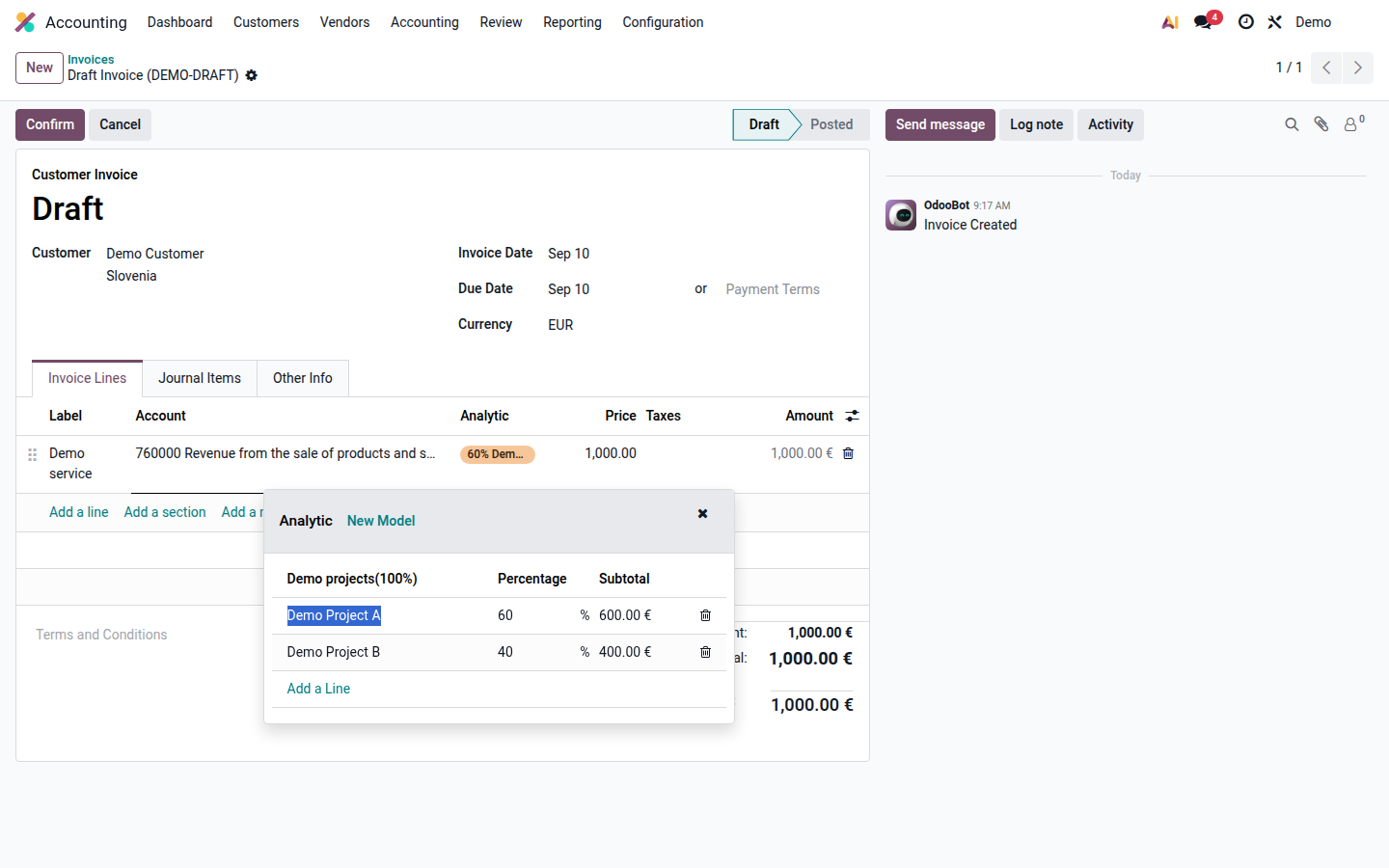
Open Analytic Distribution. Select the analytic account for each applicable plan.
-
Enter the percentages. For a mandatory plan, complete its allocation to 100%; separate plans can each describe the full amount from a different perspective.
Open image at full size (new tab) -
Review every line that needs allocation, including lines filled automatically by distribution rules. Save and confirm the document when the accounting checks are complete.
-
Review the resulting analytic entries or the analytic report using the same account and period.
For a €1,000 cost split 60% to Project A and 40% to Project B within one plan, the allocation is €600 and €400. A department plan may separately allocate the full €1,000; do not add the percentages of different plans together as if they were a single split.
If confirmation reports a missing mandatory allocation, complete the required plan rather than disabling its rule. Changes to posted allocations must follow your accounting correction policy.
Next: read financial reports.