

Record import VAT from an MRN
Quick summary: Attach the MRN to the related vendor bill, enter its number in the KIR/KPR note, and align the reported import VAT base with the customs document. Any adjustment lines leave the amount payable to the vendor unchanged.
Record the MRN on the related bill
Section titled “Record the MRN on the related bill”-
Open the draft vendor bill for the imported goods. Keep the vendor’s invoice number in Bill Reference and attach the original MRN PDF.
-
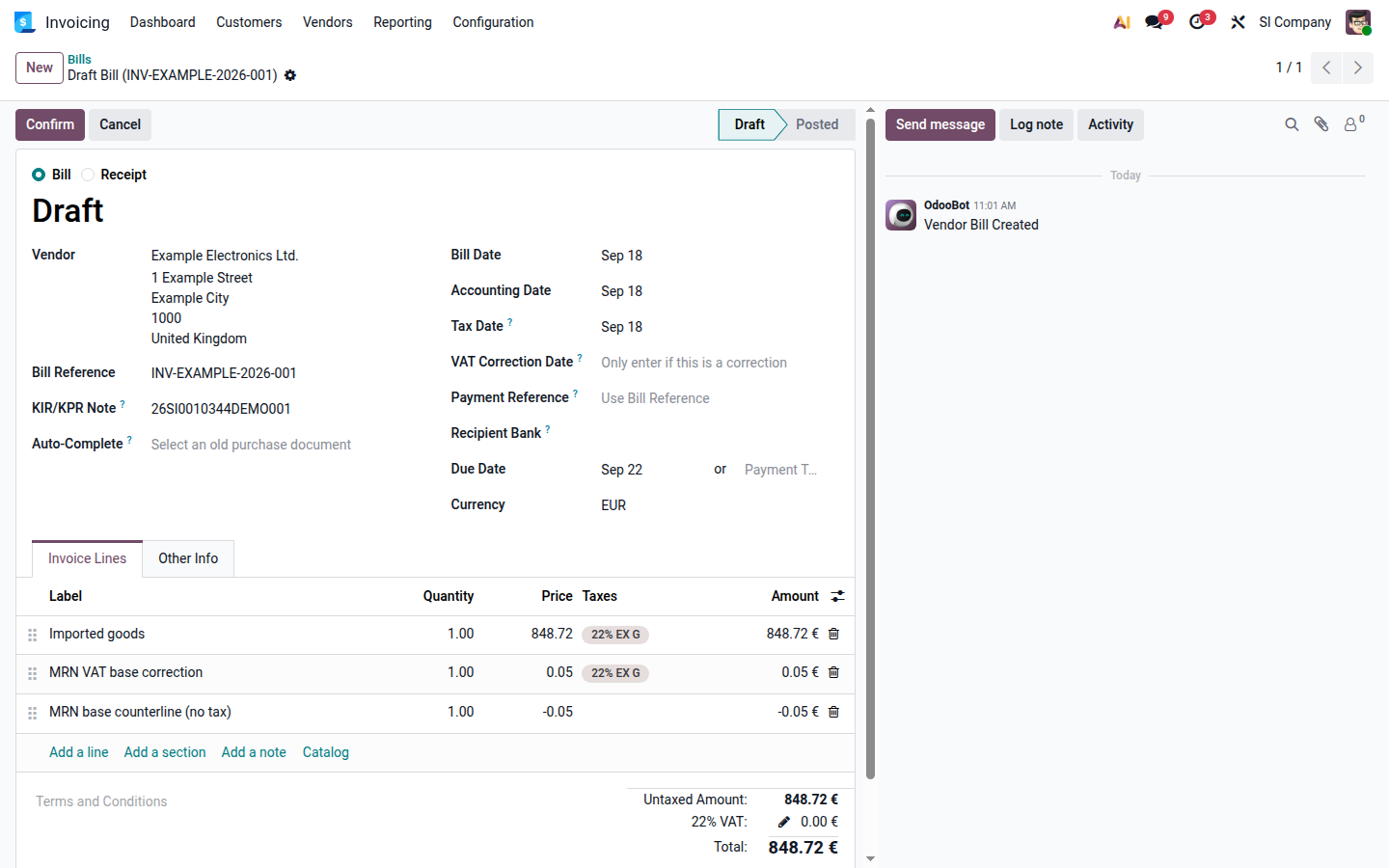
Enter the MRN number in KIR/KPR Note.
-
Set Tax Date to the reporting date confirmed by the responsible accountant from the customs document.
-
On the imported-goods lines, select the applicable import VAT tax. For example, use 22% EX G for third-country goods taxed at 22%.
-
Compare the import VAT base and VAT in Odoo with the amounts on the MRN.
-
If the bases differ, add an adjustment line for the difference and apply the same import VAT tax. Add an equal line with the opposite sign and no tax.
- If the customs base is higher, the taxed adjustment is positive and the untaxed counterline is negative.
- If the customs base is lower, the taxed adjustment is negative and the untaxed counterline is positive.
- On a foreign-currency bill, enter the adjustment in the bill currency and verify the resulting base and VAT in the company currency.
Open image at full size (new tab) -
Check that the amount payable to the vendor is unchanged and that the reported import VAT base matches the MRN. Confirm the VAT amount separately. If the base matches but the VAT does not, stop and have the responsible accountant determine how to record the remaining rounding difference.
-
Post the bill and review the Slovenian KIR/KPR and VAT reports. The untaxed counterline intentionally triggers the entries without taxes warning; confirm that the warning refers only to this counterline.